Orders, deliveries and service jobs. All in one place.Talk to Travis · 0435 458 275 ↗

JOB MANAGEMENT FOR AUSSIE TRADIES

Good on the tools.
Sorted in the office.

Quotes, jobs, your diary and invoicing. Keep it together with a simple admin portal and a field app for the people doing the work.

Less “what do I need to invoice?” at the kitchen table. More of the job recorded while it’s fresh.

No card required. Choose Trades & services when you sign up.

  • Plumbing
  • Electrical
  • Carpentry
  • Maintenance
FROM FIRST CALL TO FINISHED JOB
Trades dashboard with customer search, daily jobs, diary and invoicingTechnician phone app with assigned jobs and customer site details
Office + field. Connected.Actual app screens · fictional records

ONE JOB. A CLEAR NEXT STEP.

From “can you take a look?”
to ready to invoice.

  1. 01

    Quote the work

    Keep customer and site details together. Price labour, call-outs and materials, then turn agreed work into a job.

  2. 02

    Plan the day

    Book your team in the diary. Use day, week or month views and schedule bigger jobs across multiple days.

  3. 03

    Capture the job

    Note measurements, take photos and record the work and materials used, right there on site.

  4. 04

    Get it invoiced

    Review completed work, create and email a Brighter invoice, then record payments. Or send configured drafts to Xero.

BUILT AROUND YOUR WORKING DAY

Everything has a home.
Nothing has to live in your head.

Start with the everyday tools in Simple mode. Switch to Advanced when you want more of the workspace in view.

YOUR ADMIN PORTAL

A clear place to run the business.

Find the customer. Open their account. Check the site, past work and billing details. Then quote, book or invoice without hunting across separate notes.

  • Customer accounts and multiple sites
  • Jobs, diary and next steps together
  • Your logo and company details on documents
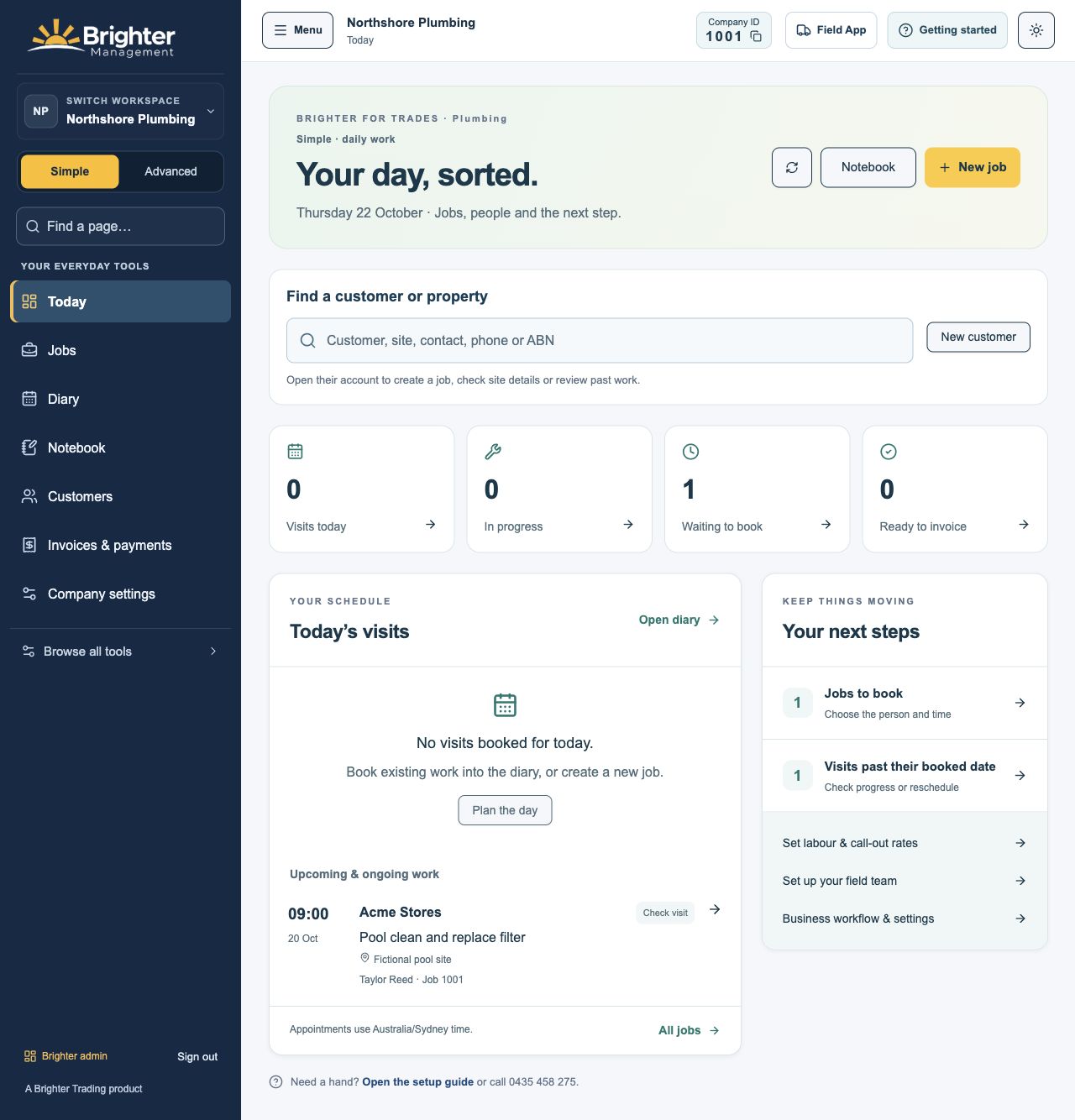
Open the full dashboard ↗
Trades Today dashboard showing the day’s visits and next actions
YOUR JOB DIARY

Make room for the big jobs.

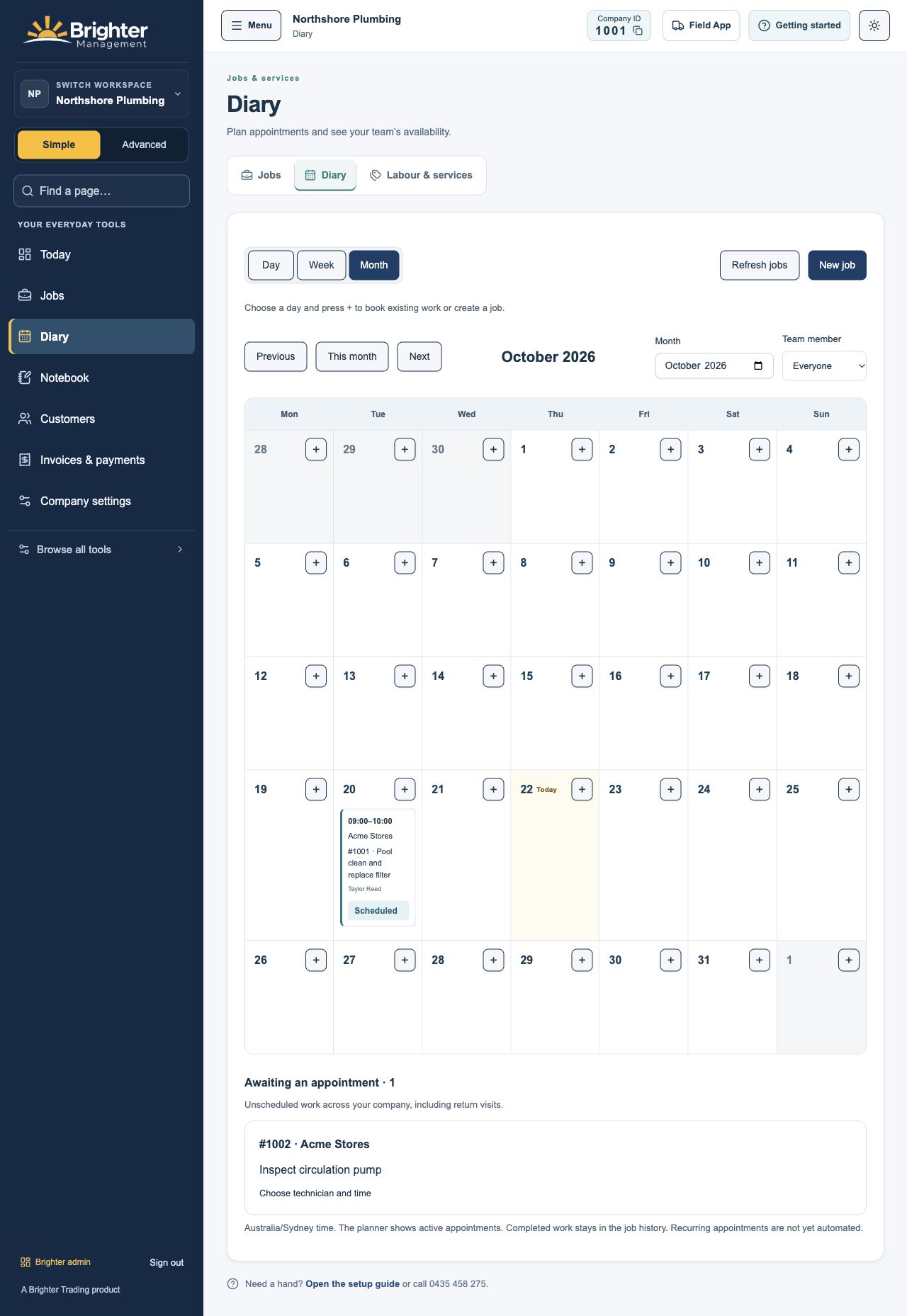
See the month ahead, assign the right person and book work over more than one day. Keep appointments linked to the job and customer.

Monthly service diary with a technician appointment and unscheduled workOpen the monthly diary ↗
YOUR JOB NOTEBOOK

Take the note. Take the photo.

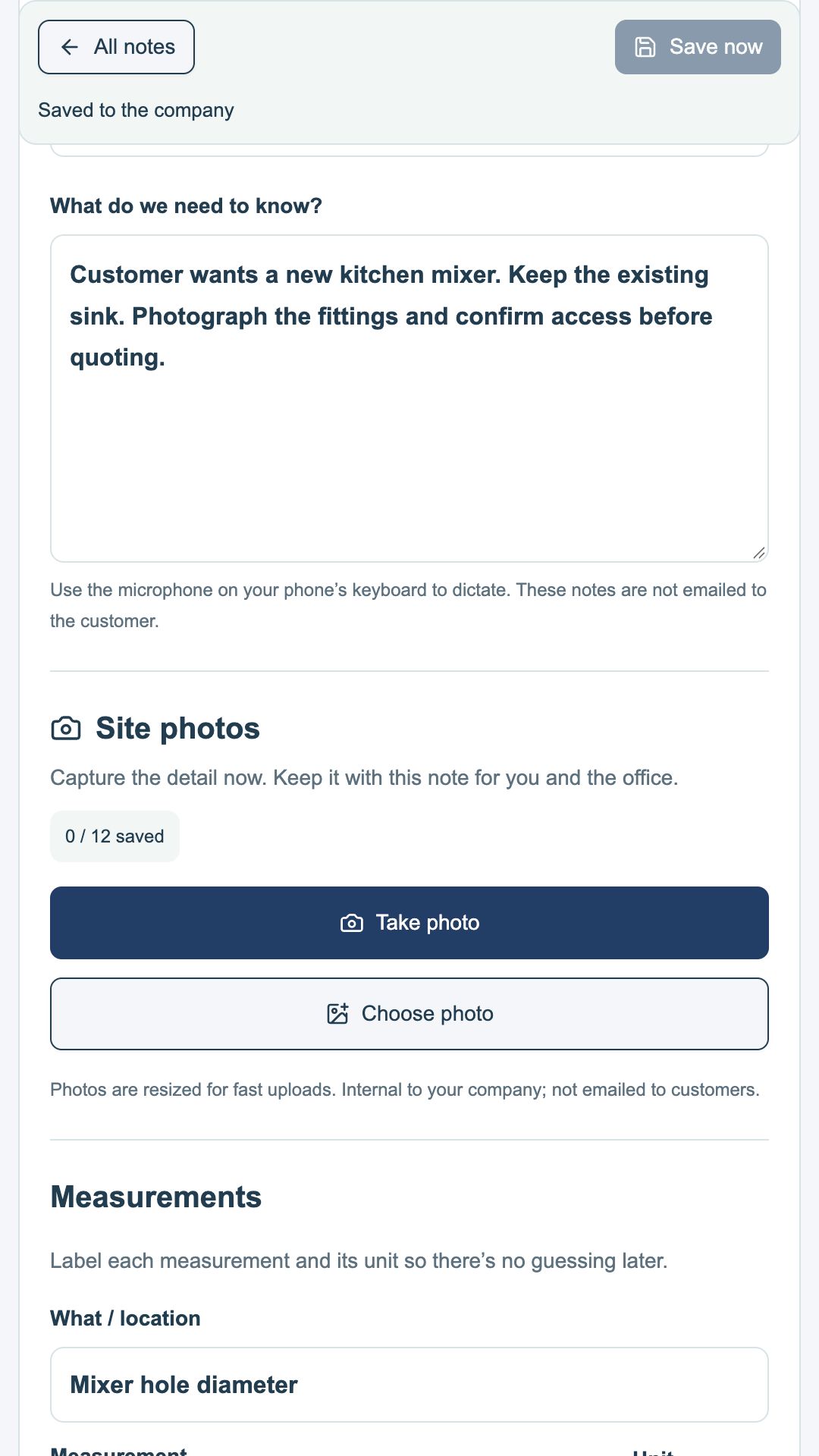
Customer requests, measurements, site photos and the details you’ll need later. Add to an existing note and keep it available to the office.

Notebook with a customer’s job details, Take photo button and measurement fieldsLook inside the notebook ↗

THE FIELD APP

Built for the person
doing the work.

The office uses BM Admin. Your technicians use BM Driver, the field app for both service jobs and deliveries.

  1. 1

    Record work

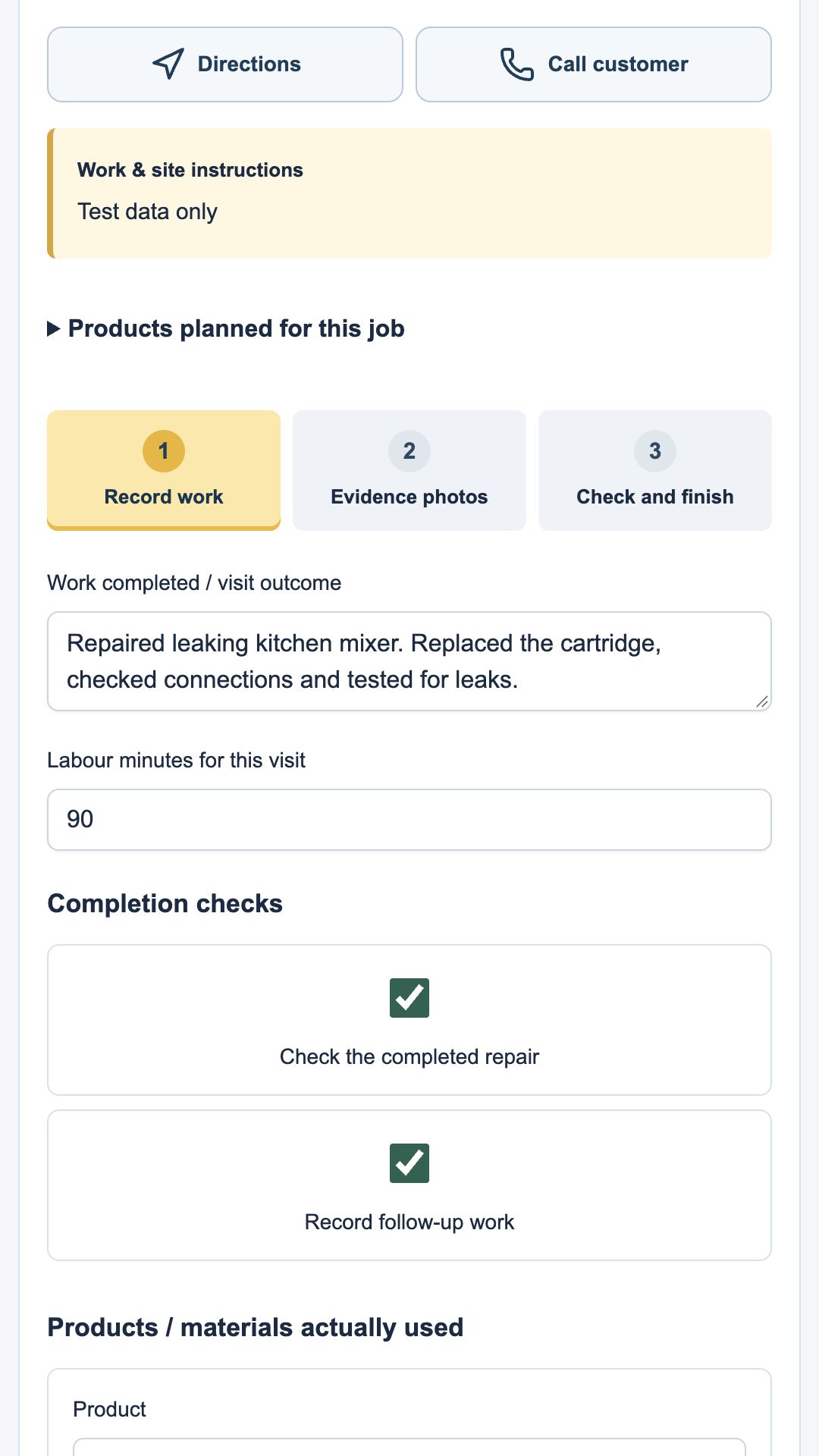
    Check the job details. Record work done, time and materials.

  2. 2

    Evidence photos

    Keep a clear visual record of the work with the job.

  3. 3

    Check and finish

    Confirm the details. Completed jobs move out of the to-do list and back to the office for review.

Sign in with a four-digit company ID, name and personal PIN. Add the app to an iPhone or Android home screen for easy access.

See how to set up your team’s phones ↗

An internet connection is required to load work and confirm saves.

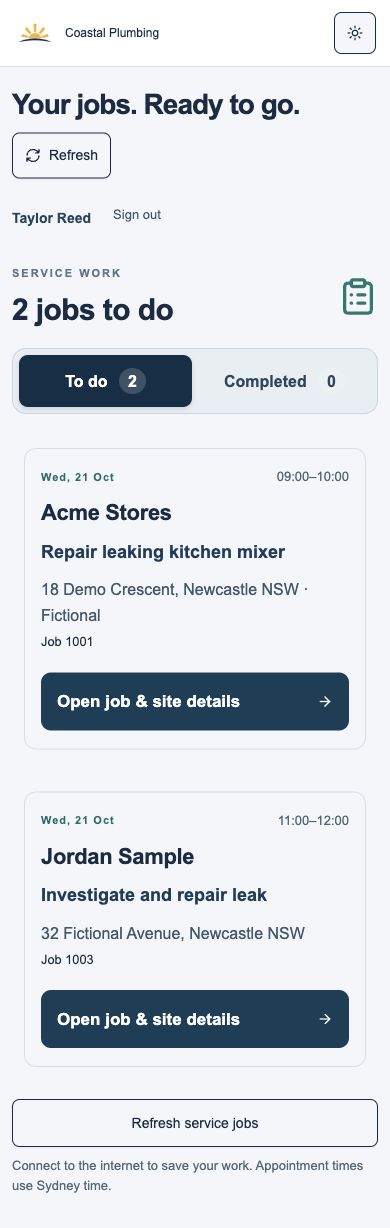
Field app showing the technician’s assigned jobs
Know what’s next.
Service completion form for recording work on site
Keep the detail.

THE DETAILS THAT SAVE ANOTHER PHONE CALL

More than a diary.

Your own service templates

Save the jobs you do often, with your own service items and rates. Keep labour and materials together.

Office review before sending

Choose whether service completion reports go to customers or only to the office for review. Check charges before invoicing.

Invoices and payment records

Create and email a branded BM invoice, record payments and see what’s outstanding. Keep a clear link to completed work.

Xero when you want it

Select Xero as your invoicing system, connect and complete the setup. Approved service charges can create draft invoices for review and sending in Xero.

Expenses and GST reports

Record expenses and GST, then export BM sales and purchase reports for your accountant. Xero invoices remain in Xero’s reports.

A real person to call

Need a hand or a feature for your workflow? Talk to Travis on 0435 458 275. Custom work is scoped and quoted together.

TRY IT ON A REAL JOB

Start free.
Grow when you’re ready.

The Trades workspace is available on every plan. Choose your plan for the amount of work and the size of your team.

GET A FEEL FOR IT

Free

A$0 / month

  • 20 jobs or orders per month
  • 20 saved customers
  • 1 office user and 1 field user
  • The Trades workflow, notebook and invoicing
Start free ↗

Choose Trades & services during signup. No card or automatic upgrade.

A FEW THINGS YOU MIGHT BE WONDERING

Keep it simple.

Is this a separate app I have to buy?

No. Trades is a workspace option inside Brighter Management, available even on Free. Pick Trades & services when you create your company. The paid Trades plan gives your team higher allowances.

Do I need Xero?

No. You can create and email invoices in Brighter and record payments there. If you prefer Xero, choose it as your company’s invoicing system and complete the connection, account and customer mapping setup. Brighter then prepares drafts; you review, approve and send them in Xero.

Can I use this on my own?

Yes. Use the admin portal to run the business and the field app when you’re on site. Your Free plan includes one office user and one field user, so you can try both sides of the workflow.

What if we deliver products as well?

You can use delivery orders and service jobs in the same company. Keep job materials with the service, and use the delivery planner and signed proof of delivery for products going out.

Can you build something specific for our trade?

Tell us what you need. We’ll work through the workflow with you and agree the scope and price before any custom development. Explore Create or call Travis on 0435 458 275.

YOUR NEXT JOB IS A GOOD PLACE TO START

Keep the job moving.
Get your evening back.

Create your company, choose Trades & services and try one job from start to finish.

Start free ↗

INSIDE BRIGHTER MANAGEMENT